Over 15 years building business software

We build the software that runs your business.

We are Salut i Aplicacions Multimèdia, S.L. From Reus (Spain) we build cloud business platforms —ERP, plant traceability, real-estate CRM and travel— plus any custom solution you need, with AI that does real work.

GestioERP

The cloud ERP for SMEs that want to stop fighting their own admin

Discover
Tapik

The POS that keeps running, even when the internet goes down

tapik.app
Fitoware

Plant passport and traceability for nurseries and ornamental plants

Discover
InmoCRM

Multi-agency real-estate CRM with AI-assisted 360º lead capture

Discover
Miqat

Multi-SaaS for travel agencies specialised in spiritual journeys

Discover
ZULUDECK

Beta · under construction

Flight operations for EASA schools: the daily board plans itself

Discover
Winalum

The ERP for aluminium joinery: module-based quotes and to-scale drawings

Discover
Schools

A tutoring school, a driving school or a music school, all on the same module

Discover
ClinicaGest · medical centres

Clinics and medical centres: one specialty or all of them

Discover
ReformGest

The job, from quote to invoice, without losing sight of the cost

Discover
Architecture practices

The commission by phases, with approval, fees and deadlines tied together

Discover
Print shops

From technical estimate to invoice, with the workshop on your phone

Discover
Law firms

The case file, its deadlines and the bill, at the office and on the lawyer’s phone

Discover
Self-storage

Storage units and caravan parking: contracts, deposits and fees that invoice themselves

Discover
TimeTracker

Legal clock-in and time-tracking app for any company

timetraker.cat
GestioERP App

GestioERP's sales and POS app for Android phone and tablet

Discover
FisioGest

The software for physiotherapy centres, with a therapist app and a patient app

Discover
Servicio Técnico (SAT)

The technician app: work orders, signature and invoice from the phone

Discover
B2B Client Portal

A panel for your clients: documents, approvals and online payment 24/7

Discover

Flagship apps

Two products with a site of their own

The point of sale and the time tracking have grown up: they have a brand, a domain and a site of their own, with open demos you can walk into without signing up.

The POS that keeps running, even when the internet goes down

Tapik is the group's point of sale, with its own site at tapik.app. Till, order-taking on the phone, kitchen display (KDS), QR menu and self-order kiosk, all inside the same program and connected to GestioERP's accounts. Every trade has its own screen -bars, supermarkets, bakeries, salons, clothing shops, veterinary clinics, computer shops and florists- and its own open demo. It runs on any Android and, if the line goes down, the tills keep talking over the local network and the sales go up on their own when it comes back.

  • The screen each trade needs — Eight trades with their own screens, buttons and open demo: not a generic program with the name changed.
  • Handheld, kitchen, menu and kiosk — The waiter takes the order at the table, the kitchen gets it by station, the customer orders by QR or at the kiosk. It is all one program.
  • It keeps taking payments offline — The tills talk over the local network, the sale is saved and, when the line returns, it uploads on its own with no duplicates.
Legal clock-in and time-tracking app for any company

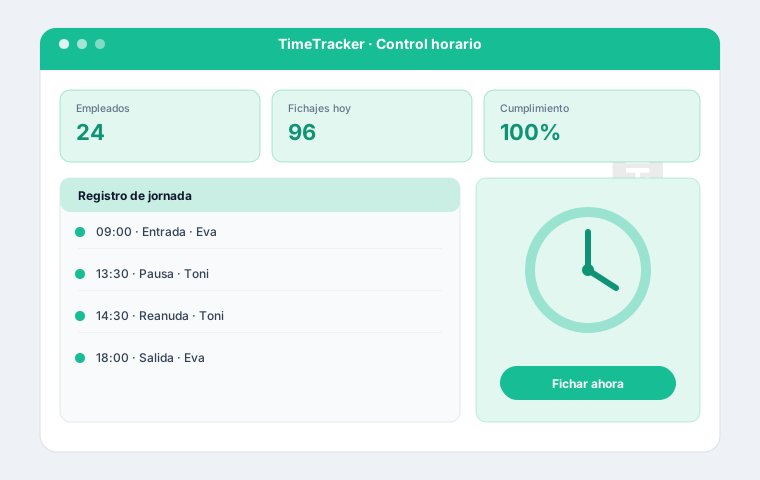
TimeTracker is the group's legal time-tracking and clock-in app, with its own site at timetraker.cat. It records working time per Spanish law (RDL 8/2019, art. 34.9 ET) from mobile, kiosk or browser, with immutable records kept for 4 years, absence, holiday and shift management, and reports available to the worker and the Labour Inspectorate. It runs on its own or integrated into GestioERP.

  • Multi-channel clock-in — Clock in and out from mobile, a tablet kiosk or the browser, with optional geolocation.
  • Immutable, compliant records — Working time per Spanish law (RDL 8/2019, art. 34.9 ET): tamper-proof HMAC-chained records kept for 4 years.
  • Absences, holidays and shifts — Holiday requests and approvals, absence control and schedules per employee and team.
+15

years of experience

19

products in production

+100

modules in GestioERP

100%

cloud, from the browser

Ecosystem

One group, several platforms, one standard

Each product solves a different sector, but they share cloud architecture, security and the same obsession: the software should disappear and the work should get done.

GestioERP

The cloud ERP for SMEs that want to stop fighting their own admin

A complete, modular ERP: invoicing, POS, accounting, warehouse, CRM, time tracking and online store. It meets the Spanish Verifactu and TicketBAI rules, runs in the browser and grows module by module. With over 100 modules, you switch on only what you use.

  • Compliant invoicing. Verifactu, TicketBAI and e-invoicing built in.
  • Touch POS and app. Point of sale for retail and hospitality, with an Android app and ESC/POS printing.
  • Integrated accounting. Automatic journal entries, taxes and year-end close with no double work.
  • Warehouse and traceability. Multi-warehouse stock, batches, serial numbers and locations.
  • CRM and time tracking. Sales opportunities and legally compliant working-time records.
  • Genuinely modular. Over 100 modules: switch on only what you use and pay only for that.

Tapik

The POS that keeps running, even when the internet goes down

Tapik is the group's point of sale, with its own site at tapik.app. Till, order-taking on the phone, kitchen display (KDS), QR menu and self-order kiosk, all inside the same program and connected to GestioERP's accounts. Every trade has its own screen -bars, supermarkets, bakeries, salons, clothing shops, veterinary clinics, computer shops and florists- and its own open demo. It runs on any Android and, if the line goes down, the tills keep talking over the local network and the sales go up on their own when it comes back.

  • The screen each trade needs. Eight trades with their own screens, buttons and open demo: not a generic program with the name changed.
  • Handheld, kitchen, menu and kiosk. The waiter takes the order at the table, the kitchen gets it by station, the customer orders by QR or at the kiosk. It is all one program.
  • It keeps taking payments offline. The tills talk over the local network, the sale is saved and, when the line returns, it uploads on its own with no duplicates.
  • Take payment however the customer likes. Bank card terminal or SumUp reader over Bluetooth, NFC with the phone itself, payment gateways, cash with a smart drawer and split bills.
  • It talks to the counter you already have. Barcode scanner, connected scale, thermal printer, a second screen for the customer and drawers that count and return the change.
  • The sale is already in the accounts. It is GestioERP's POS: what you take today counts in the stock, the reports and the tax return, with nothing to export. Ready for Verifactu.

Fitoware

Plant passport and traceability for nurseries and ornamental plants

Manage the botanical species catalogue, link it to your items and issue the European plant passport (EU Regulation 2016/2031, format 2017/2313) as a PDF with the A·B·C·D elements and a QR code, ready to print the nursery label.

  • Species catalogue. Botanical name, genus, family and species code linked to the item.
  • Passport in one click. PDF with the A·B·C·D elements, a QR code and the official 2017/2313 format.
  • Batch traceability. From the source batch to the end customer’s label.
  • Two platforms. Business Central or GestioERP: the same regulation, the ERP you already use.

InmoCRM

Multi-agency real-estate CRM with AI-assisted 360º lead capture

A multi-agency (multi-tenant) platform for networks and independent agencies: each agency with its own panel, users and public website. It covers the full sales cycle —sales funnel, lead pipeline, properties, calendar, clients and agents with commissions— and adds AI-assisted lead capture, AI contract and document generation, publishing to real-estate portals and a website builder for each agency’s storefront. A global super-admin manages every agency, user and log from one place.

  • True multi-agency. Panel, users, data and website isolated per agency; a global super-admin over all of them.
  • Sales funnel and leads. From incoming contact to close: lead pipeline, sales tracking and deals.
  • Properties and portals. Listings with zones and types, valuations and publishing to real-estate portals.
  • 360º lead capture with AI. Opportunity scoring and listing analysis: which owner to call and when.
  • AI documents and contracts. Document management and AI generation of contracts (deposit, listing agreement…).
  • Website builder and calendar. Each agency builds and publishes its site; visit calendar, agents and commissions.

Miqat

Multi-SaaS for travel agencies specialised in spiritual journeys

A multi-agency platform for the Muslim spiritual journey —Umrah and Hajj. Each agency manages its packages, pilgrim groups and paperwork from its own CRM, with the public booking site connected.

  • Pilgrimage packages. Flight, accommodation, transfers and visa in one sellable product.
  • Pilgrim CRM. Profile, paperwork and tracking of every traveller, from booking to return.
  • Groups and guides. Organise departures by group, with an assigned guide and seat control.
  • Multi-agency. Each agency with its own brand, catalogue and separate data.

ZULUDECK

Beta · under construction

Flight operations for EASA schools: the daily board plans itself

ZULUDECK is the flight-operations platform for EASA flying schools and approved training organisations (ATOs), with its own website at zuludeck.com. It builds tomorrow from what it already knows —who is current, who flew what, which aircraft is closest to maintenance and which mission each student is due— and you just review and approve it. Pilot and instructor records fill themselves from the documents, with the checks already done; each aircraft’s hours come from the closed flights; the syllabus is your school’s own, assessed by competency, and the hours go out clean to billing. As an optional module, every flight records itself and can be replayed in 3D over the terrain.

  • The board plans itself. Instructors and their duty, each student’s next mission, the right aircraft, licences and medicals valid on the day of the flight, daylight and your own rules. It says which rule it applied, and nothing is scheduled behind your back.
  • Records that check themselves. Passport, ID card, medical or licence: a photo is enough. It reads the MRZ with its check digits, cross-checks names between documents —and asks if they don’t match— and warns before anything expires.
  • Fleet and maintenance. Hours come from closed flights, not typed in. 50 h, 100 h, annual and ARC checks are worked out from the last one actually done, and a flight that would run past the limit in the air cannot be booked.
  • Your school’s syllabus. Your phases, your exercises and your order, with versions: a published one is frozen and the record says which one each student flew. Competency-based assessment and each intake’s progress at a glance.
  • The flight, in 3D. Optional module: with a tracker in the aircraft, the flight is detected on its own, matched to its booking and replayed over the terrain, with bank, low-level descent and load-factor flags on your thresholds.
  • Hours out to your billing. Closed flights come out as Excel or CSV —block hours in decimal, aircraft, student, instructor and mission— or through its documented REST API. In Catalan, Spanish and English, and with your data always exportable.

Winalum

The ERP for aluminium joinery: module-based quotes and to-scale drawings

Winalum is the vertical ERP for aluminium joinery, built on top of GestioERP. It builds quotes from parametric window and door modules: you define each opening by measurements (width × height in mm) and the system computes the m², explodes the materials via formulas, applies the per-colour price and the customer tariff, and draws each opening to scale. From quote to order and invoice, reusing GestioERP customers, taxes and documents.

  • Module-based quotes. Parametric window and door modules that explode into materials via formulas (A−35, (A+B)/2…).
  • Live to-scale drawing. Each opening is drawn to real scale from its measurements, opening type and profile colour.
  • Materials by colour and tariff. Materials catalogue with per-colour pricing, families with tariffs (1/2/3) and supplier discount.
  • m², cuts and bill of materials. Square-metre calculation, mitre or square cut and material breakdown for each opening.
  • On top of GestioERP. Reuses GestioERP customers, VAT and documents; transfer of the quote to order and invoice.
  • Migration from WinAlum. Modernises the legacy desktop WinAlum (Delphi/Firebird) by moving it to the cloud with GestioERP.

Schools

A tutoring school, a driving school or a music school, all on the same module

Students with a tutor, teachers, subjects, timetabled groups and enrolments with their syllabus and their monthly fee. The teacher takes the register from a phone and the class is closed with a mark; fees are invoiced every month and collected by SEPA direct debit. You pick the type of school —tutoring, driving, flying, sailing, music, languages, sports, sewing, cooking, IT— and the module changes the wording and the fields. Students, teachers and management each get their app, reached by QR without using up a licence.

  • Timetabled groups and register. Days, times, room, places and monthly price. The teacher registers the whole group at once from the phone and one class per student comes out, with attendance and mark.
  • Syllabus, topic by topic. All the way to the exam, with target date, hours, materials and mark. The student sees it in their app; the teacher ticks it off.
  • Monthly fees and SEPA direct debit. Every enrolment creates its fee: invoiced each month, with the direct debits going into the bank run. What is outstanding shows at a glance.
  • Enrolments from the website. The enrolment block shows the groups with free places; the request lands in the tray and becomes an enrolment without typing anything twice.
  • Three apps: student, teacher and management. The student sees their progress and next classes; the teacher, their diary and the register; management, the month’s fees, the direct debits and the enrolments. Each one gets in with their own QR.

ClinicaGest · medical centres

Clinics and medical centres: one specialty or all of them

A dental clinic, a psychology or physiotherapy practice, a dermatology consulting room or a whole multi-specialty centre, all on the same module. Patients with clinical history, a diary per practitioner with the column view, consents signed on a tablet, insurers covering part of the bill and invoicing for the rest. Reception moves appointments and marks who has arrived; the practitioner sees their own consulting room and their own patients’ history, and for data-protection reasons not anyone else’s.

  • One module, any specialty. Five centre profiles —dental, psychology, physiotherapy, dermatology and multi-specialty— each with its own specialties and treatment catalogue.
  • A diary per practitioner. Day, week, month and the per-professional column view. Drag to move an appointment, pull its edge to make it longer, click a gap to book.
  • A proper clinical history. What was done, when, with what and by whom. Attachments, photos and consents signed on the tablet, tied to the visit.
  • Insurers and health plans. What the insurer pays and what the patient pays, kept apart on the same bill, with its own scale per treatment.
  • Everyone sees their own. Reception moves the diary and takes payment, but never opens a clinical history. The practitioner sees their own. That is how you meet data-protection rules without fighting the software.

ReformGest

The job, from quote to invoice, without losing sight of the cost

Jobs with their chapters and line items, each one with materials and labour, and the budgeted cost sitting next to the real one from day one. The workers log hours and materials from their phones and collect the customer’s signature; the foreman sees the same job with the figures: contracted, invoiced, collected and what is eating the margin. Certifications and the invoice come straight out of that, with nothing typed twice.

  • Jobs by state. Quoted, under way and finished, on a board where a job moves column with the mouse. At a glance: what is open and what is stuck.
  • Chapters with materials and labour. Every line with what it contains, so you can quote without guessing and later know where the money went.
  • Budgeted cost against real. The overrun shows while the job is still alive, not when it closes. Which is when you can still do something about it.
  • The worker’s job sheet, from the phone. Start, pause and finish, with hours and materials and the customer’s signature. No amounts: the worker does not see the money.
  • Certifications and job invoicing. What has been built is certified and invoiced tied to the job, with its costs behind it. The accounts already have it.

Architecture practices

The commission by phases, with approval, fees and deadlines tied together

The commission record with its file number —no duplicates allowed—, the site, the land-registry reference, the professional body and the approval number, and fees calculated on the works budget with each phase weighted. The day’s work goes onto a board by phase —preliminary studies, outline, basic, detailed design, site supervision and settlement— and the deadlines onto a Gantt with dependencies: site supervision does not start until the detailed design is done. The dashboard calls out what is late and what is due this week.

  • File number and professional approval. The number follows the practice’s own pattern and refuses duplicates. Site, land-registry reference, professional body, approval number and date.
  • Fees on the works budget. Enter the works budget and the percentage and the fees work themselves out. Each phase carries its own weight within the commission.
  • A board by phase. One column per phase and tasks moving between them with the mouse. Priority, deadline, overdue warnings and the approval milestone.
  • Gantt with dependencies. Deadlines on a timeline with today’s marker, and tasks tied to each other: move one and everything hanging off it moves too.
  • The practice dashboard. Live and late commissions, overdue tasks, contracted fees, each person’s workload and what is due this week. Exportable to PDF and Excel.

Print shops

From technical estimate to invoice, with the workshop on your phone

The technical estimate is worked out with your presses, your operations and your paper —impositions per sheet, passes, plates, ink and every finishing step with its price bands— and whatever you leave empty the software proposes: the cheapest press, sheet and paper. Once accepted, the work order appears on its own with its route sheet; the workshop logs each operation and the actual cost works itself out. From the finished order come the delivery note, priced or not, and the invoice. And if you are on LogicPrint, we bring over your customers, presses, papers and the whole history.

  • Technical estimate with “Propose”. It tries every press that can run the job, with its sheets and your papers, and keeps the cheapest. Several quantities at once, variants and jobs with cover and inside.
  • Offer letter. As a PDF and by email, with the technical sheet and the price for each quantity. If the customer accepts it on the portal, the work order is created automatically.
  • Workshop with time sheets and monitor. A production board by status, time sheets with phases and incidents, good pieces, ink and plates, and a kiosk mode for each press’s tablet.
  • No paper surprises. What the work orders need against stock, without counting what is already ordered; supplier orders rounded to the lot, reserved on launch and consumed on completion.
  • Delivery note, invoice and reports. Priced or unpriced delivery notes and the usual invoice. Profitability, estimate acceptance, machine load and planned-versus-actual deviations.
  • From LogicPrint. The importer reads the backup and brings over customers, suppliers, papers, presses, operations and the history of estimates, work orders, delivery notes and invoices.

Law firms

The case file, its deadlines and the bill, at the office and on the lawyer’s phone

Case files by area of law and type, with their clients and opposing parties —each with their own lawyer, court representative and expert—, the court proceedings with the court and case number, and the work items that make up the bill. Deadlines warn before they fall due; the engagement letter comes from the firm’s own templates with the fee agreement, the payment on account and the retainer. When billing, disbursements carry no VAT, withholding tax is applied and the payment on account is deducted. And the lawyer carries the firm on their phone: logs the work on the way out of court, uploads documents with the camera and collects the client’s signature, even with no signal.

  • Case files and proceedings. Automatic code, area of law, type and status; clients and opposing parties with their professionals; court, case number and procedural stage.
  • Deadlines and the lawyer’s diary. Deadlines warn before they fall due, with a notification on the phone too, and an appointment requested on the website lands straight in the lawyer’s diary.
  • Engagement letter. The engagement with its terms —scope, fees, payment on account, success fee or periodic retainer— and the contract as a PDF from the firm’s templates.
  • Bills with disbursements and withholding. Billable work items make up the bill: disbursements carry no VAT, withholding is applied, the payment on account is deducted and the client account never goes negative.
  • The lawyer’s app. In with a link or a username; logs work items even with no signal, uploads documents with the camera, collects the client’s signature and sees what is still to collect.

Self-storage

Storage units and caravan parking: contracts, deposits and fees that invoice themselves

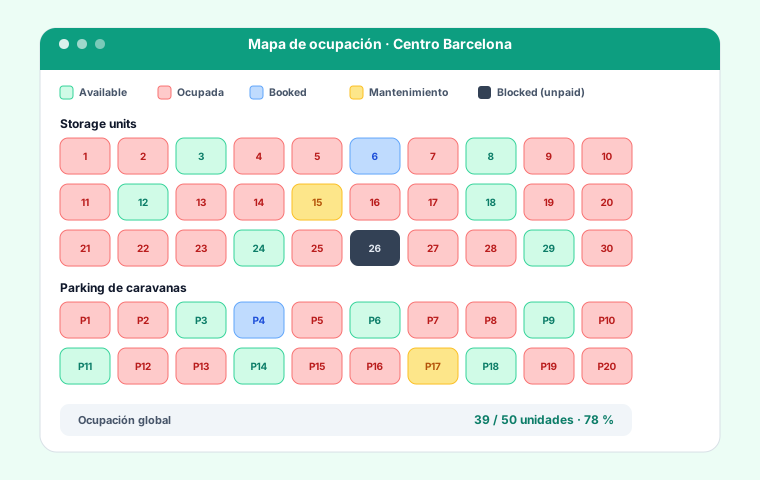
A self-storage business end to end: the inventory of storage units and caravan parking spaces per site, with their size, category and status; monthly, quarterly, half-yearly or yearly rates with a price of its own for each unit; contracts with reservation, notice and end, access details and scanned documents; the deposit collected, returned or withheld with its accounting entry, and the fees, generated on their own as delivery notes or invoices according to each contract’s frequency. The occupancy map shows at a glance what is free, what is rented and what ends this month.

  • Storage units and parking. Unit inventory per site, with categories, size and status: free, rented, reserved or under maintenance.
  • Rates and per-unit pricing. Monthly, quarterly, half-yearly or yearly rates, and each unit with its own price when needed.
  • Contracts with a lifecycle. Reserved, active, on notice and ended; access details, scanned documents and an audited change history. The contract prints to PDF.
  • Deposits in the accounts. Collecting, returning and withholding the deposit, each one with a real accounting entry.
  • Recurring billing. Fees are generated on their own as delivery notes or invoices according to each contract’s frequency.
  • Occupancy map and reports. Each site’s space map and a dashboard with occupancy, active contracts and recurring revenue.

TimeTracker

Legal clock-in and time-tracking app for any company

TimeTracker is the group's legal time-tracking and clock-in app, with its own site at timetraker.cat. It records working time per Spanish law (RDL 8/2019, art. 34.9 ET) from mobile, kiosk or browser, with immutable records kept for 4 years, absence, holiday and shift management, and reports available to the worker and the Labour Inspectorate. It runs on its own or integrated into GestioERP.

  • Multi-channel clock-in. Clock in and out from mobile, a tablet kiosk or the browser, with optional geolocation.
  • Immutable, compliant records. Working time per Spanish law (RDL 8/2019, art. 34.9 ET): tamper-proof HMAC-chained records kept for 4 years.
  • Absences, holidays and shifts. Holiday requests and approvals, absence control and schedules per employee and team.
  • Reports and compliance. Working-time reports available to the worker, the works council and the Labour Inspectorate, exportable to PDF and Excel.
  • Integrates with GestioERP. Runs on its own at timetraker.cat or integrated into GestioERP to feed hours into payroll and projects.

GestioERP App

GestioERP's sales and POS app for Android phone and tablet

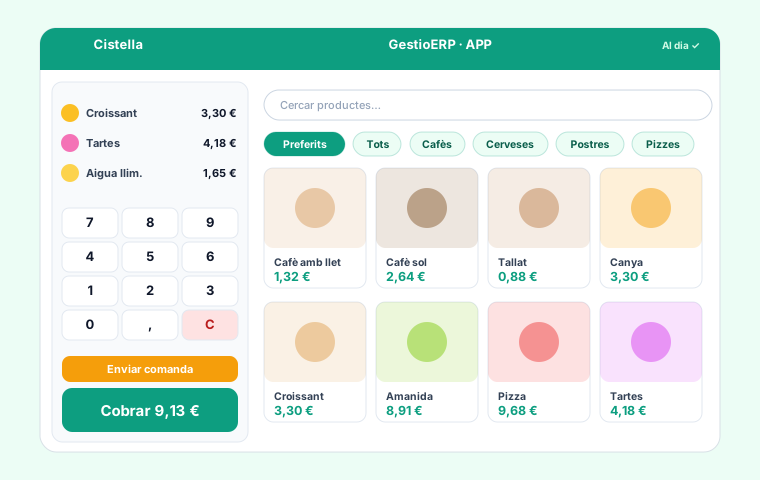
The GestioERP sales app turns any Android phone or tablet into a full POS for retail and hospitality. Sell from a photo product grid, manage the table plan with its states, send orders to the kitchen (KDS), take cash, card or contactless payments with split payments and tips, and control each employee by PIN. It works offline —with the catalogue in memory and an offline sales queue— and syncs with GestioERP as soon as the internet returns, printing tickets over ESC/POS. Install it by downloading the APK on the device.

  • Touch sales with photos. Product grid with images, families, favourites, search and barcode scanning.
  • Table plan. Zones and states (free, busy, in kitchen…), covers and join, split and transfer operations.
  • Send to kitchen (KDS). Send the order to the kitchen display or printer by zone, only the new items.
  • Full checkout. Cash, card and contactless, split payments, change, discounts and tips.
  • Staff and permissions. Each waiter logs in with a PIN and avatar; you control who edits the plan or gives discounts.
  • Works offline. In-memory catalogue and an offline sales queue that syncs when the connection returns.

FisioGest

The software for physiotherapy centres, with a therapist app and a patient app

FisioGest runs physiotherapy, osteopathy and rehab centres with two connected apps. The therapist app brings together the per-therapist calendar, the clinical history (condition, background and GDPR), treatment plans with session bundles, progress (VAS scale and mobility) and a video exercise library by body region, all integrated with billing. The patient app gives them mobile access to their appointments, session bundle and the video exercises prescribed by their therapist. It is a GestioERP vertical.

  • Patient history. Condition, background and GDPR consent, with the patient's full progress.
  • Treatment plans with bundles. Session bundles with cost calculation and automatic hand-off to billing.
  • Progress with the VAS scale. Session-by-session progress: pain (VAS), mobility and notes.
  • Video exercise library. Exercises by body region, with sets and videos, ready to assign.
  • Patient app. The patient sees their appointments, session bundle and video exercises on their phone.

Servicio Técnico (SAT)

The technician app: work orders, signature and invoice from the phone

GestioERP's field-service (SAT) app runs the whole service cycle: it creates work orders with automatic codes and states (new, on hold, resolved, closed, invoiced), logs hours, materials, photos and the customer's signature from the phone, and generates the delivery note or invoice in one click. It keeps a record of every customer and machine with its history, manages maintenance contracts with alerts and a technical solutions wiki. It works on the technician's phone and on the office computer.

  • Service orders (work orders). Automatic code, states (new, on hold, resolved, closed, invoiced), priorities and change history.
  • Hours, materials and signature. Log labour and materials used, upload photos and capture the customer's signature from the phone.
  • Invoice in one click. From the logged hours and materials the delivery note or invoice is generated automatically.
  • Customers, machines and history. A record for each customer and each machine, with the full history of interventions.
  • Maintenance contracts. Recurring fees and scheduled-maintenance alerts so no service is missed.
  • Technical wiki. A knowledge base with solutions and documentation, available on phone and desktop.

B2B Client Portal

A panel for your clients: documents, approvals and online payment 24/7

The Client Portal adds a panel where your clients handle everything with your company 24/7. They view and edit their data, see quotes, orders, delivery notes and invoices, approve or cancel quotes and orders, and pay online securely (card via Redsys/VISA, PayPal or Stripe). They also open support tickets, buy from the catalogue, download their PDFs and check the status of each document (paid, pending or overdue). Each client logs in with their own account and only sees their data, and the portal carries your brand and domain.

  • Data and documents. The client views and edits their data and checks their quotes, orders, delivery notes and invoices.
  • Approve quotes and orders. Clients approve or cancel quotes and orders directly from the portal.
  • Secure online payment. Pay quotes, orders and invoices by card (Redsys/VISA), PayPal or Stripe.
  • Support tickets. Clients create and comment on support tickets, with tracking of each query.
  • Catalogue and online orders. They browse the product catalogue and place orders online right from the portal.
  • PDF, history and secure access. Download documents as PDF, see status (paid/pending/overdue) and history; with your own logo and domain.

Applied AI

AI that does the work, not just the demo

AI lives inside the product and on the client’s own data: it prioritises, drafts, classifies and executes. If it does not save hours, it does not ship.

Natural-language assistant

Ask about your data the way you would ask a colleague. Read-only engine, encrypted API key, compatible with Claude, OpenAI and Gemini.

Analytics and alerts

A real-time KPI dashboard, smart alerts and an AI consultant that reads your invoicing, finances, customers and inventory.

Document reading

Invoices, delivery notes and receipts go in via OCR and come out as records and journal entries, not PDFs forgotten in a folder.

Data in Europe

European cloud infrastructure, GDPR and Spanish tax compliance (Verifactu, TicketBAI). Local AI with Ollama too, if you want nothing to leave your premises.

In production, today

Custom development

If it doesn't exist, we build it

We build any software solution from scratch, on any platform and any cloud. It is what we have been doing for over fifteen years, and where all our products came from.

Tell us about your project

Sectors

Where we already work

Nursery and agri

Plant traceability and phytosanitary passport.

Real estate

Lead capture, CRM and website per agency.

Retail and hospitality

POS, stock and compliant invoicing.

Services and workshops

Work orders, field service and time tracking.

Health and clinics

Appointment scheduling and visit billing.

Travel

Packages, groups and traveller paperwork.

Construction

Work certifications and progress billing.

Transport

Routes, fleet and job sheets.

Technology and partners

  • Microsoft Dynamics 365 Business Central
  • Slave Computer
  • Ionnavis
  • Supabase

Got a process that doesn't fit any software?

That's exactly what we've been solving for years. Tell us about it and we'll tell you if it has a solution —and which one.

Get in touch